How to Automate Instagram Reels: Pipeline, API Limits, Tools
You can automate three of a reel's six steps: the voiceover, the video build and the publishing. Meta's API publishes reels in a two-step container flow, 100 posts per 24 hours; Buffer does it free for 3 channels. The script, the review and the replies stay human. Checked 10 Nov 2026.

"How to automate Instagram Reels" means two different things to the people typing it. One group wants a scheduler so a week's reels go out while they sleep. The other wants a machine that invents, voices, edits and posts reels with nobody watching. The first is a solved problem with a free tier. The second produces the feed of samey AI clips you already scroll past, and in India since February 2026 it also walks into a labelling rule. This guide builds the pipeline that works: automate the mechanical steps, keep the two judgement calls, and know the exact limits Meta's documentation sets.
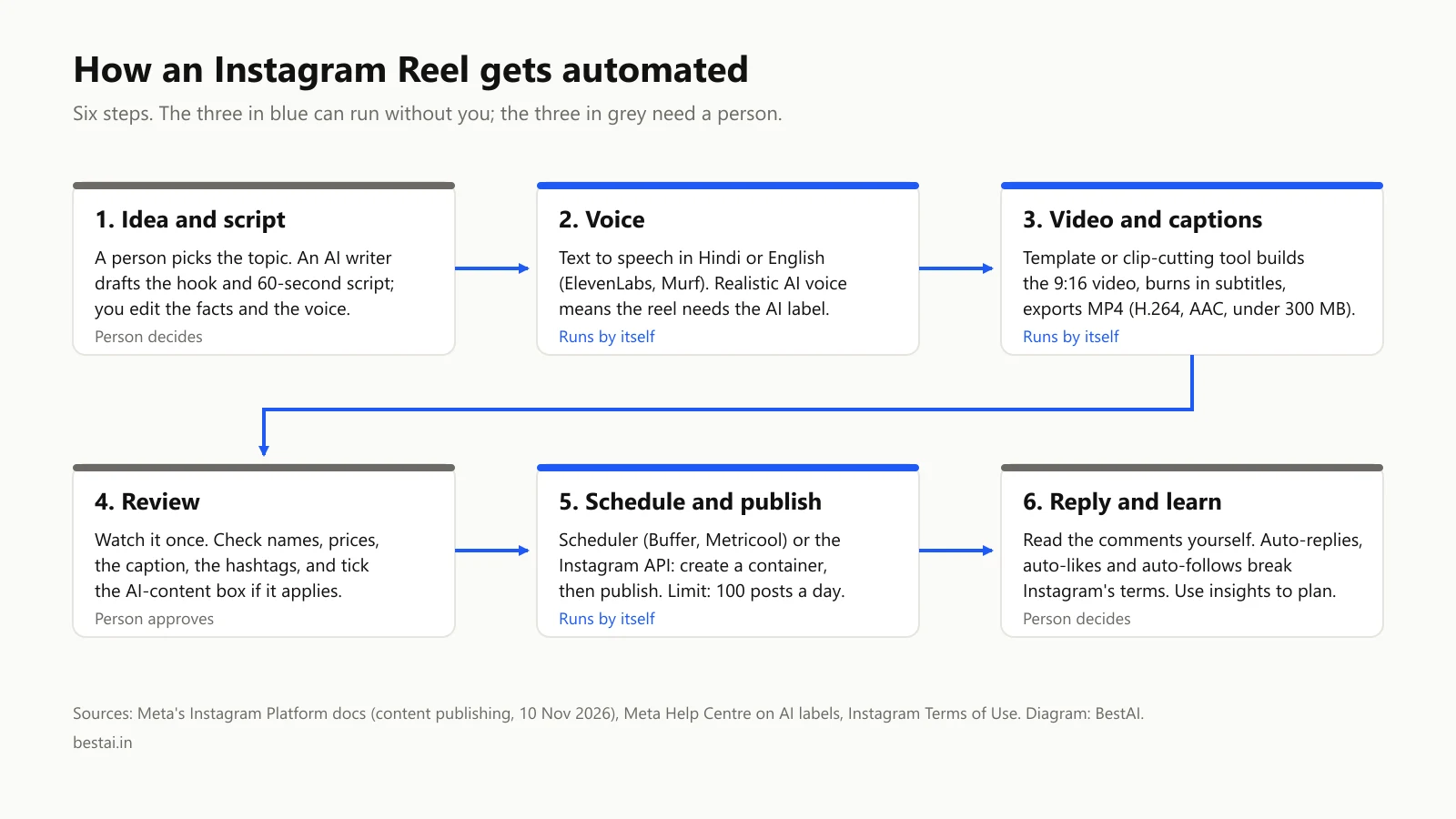
How to automate Instagram Reels: the six steps, three of them by machine
| Step | Automate? | What does it |
|---|---|---|
| 1. Idea and script | No | You choose the topic; an AI writer drafts the hook and script; you fix the facts |
| 2. Voiceover | Yes | Text to speech in Hindi or English |
| 3. Video and captions | Yes | A template or clip tool builds the 9:16 video with subtitles |
| 4. Review | No | One viewing: names, prices, caption, hashtags, the AI label |
| 5. Schedule and publish | Yes | A scheduler or the Instagram API |
| 6. Reply and learn | No | Comments by hand; insights to plan the next batch |
The two human steps are not sentiment. Step 1 is where the reel earns a view: a hook about a rupee price, a deadline, a local scene. Step 4 is where you catch the AI voice mispronouncing a name and tick the AI-content box that Meta requires for "a reel narrated with a realistic AI-generated voiceover" (details in our Instagram AI label guide).
Step 5 first: what Meta's API allows
Everything that publishes a reel for you, from Buffer to a Make scenario, ends at the same Instagram Platform API, so its limits are everyone's limits. From Meta's content publishing documentation and the media reference, read on 10 November 2026:
- You need a professional account. The API publishes to "an Instagram professional account" (Business or Creator), either through a connected Facebook Page or Instagram Login, with the
instagram_content_publishorinstagram_business_content_publishpermission. - Publishing is two steps. "To publish a reel, create a container for the video and include the
media_type=REELSparameter along with the path to the video using thevideo_urlparameter," then publish the container withmedia_publish. The video "must be hosted on a publicly accessible server at the time of the attempt." - The limits. "Instagram accounts are limited to 100 API-published posts within a 24-hour moving period." Separately, "An Instagram account can only create 400 containers within a rolling 24 hour period," and "Containers expire after 24 hours."
- There is no schedule button in the API. Neither page offers a scheduled-publish parameter; the scheduler has to hold your reel and run the two steps at the right time, inside the 24-hour container window. That is the whole product Buffer and its rivals sell.
- The AI flag. "To provide a self-disclosure of AI usage in the media, you can set
is_ai_generatedparameter totrue." - The file. "MOV or MP4", H.264 or HEVC video, AAC audio, "23-60 FPS", recommended 9:16, "15 mins maximum, 3 seconds minimum", "300MB maximum". Export to this once and every tool downstream is happy.
Three ways to drive it
| Route | Good for | Price seen on 10 Nov 2026 |
|---|---|---|
| Buffer | One person, a few accounts, a queue | Free: "Connect up to 3 channels", "10 scheduled posts per channel"; Essentials $5 a month per channel ($60 a year), unlimited posts |
| Metricool | Several brands, analytics in one place | Free: "Schedule up to 20 posts per month" for one brand; paid from $20 a month on annual billing ($25 monthly) |
| Later | Teams, approvals | Starter $18.75 a month billed yearly, "Schedule up to 30 posts per profile", 14-day trial |
| Make or n8n | Reels generated by a workflow, posted straight from it | Make free plan 1,000 credits a month; n8n free to self-host; both call the same two API steps |
All three schedulers bill in dollars from India. For a workflow tool the choice is price model: Make charges a credit per module run, n8n one execution per workflow, which our Make vs n8n comparison and the Make pricing guide work through.
Steps 2 and 3: voice and video
Voice. Text-to-speech tools produce the narration from the script in one call. ElevenLabs's free plan gives 10,000 credits a month, about ten minutes, for non-commercial use only, with Hindi, Marathi, Telugu and Bengali on its v3 and v4 models; Murf's free plan gives ten minutes with no downloads, and its Creator plan $228 a year for 24 hours of voice. Both outputs are "realistic-sounding audio" in Meta's words, which is why step 4 includes the AI box.
Video. Two patterns work without a human editor. A template tool assembles stock or your own clips to the voice track and burns in captions (Canva shows rupee prices in India: Pro at ₹4,000 a year for one person, with a free tier). A clipping tool takes a long recording and cuts it into reels with subtitles: Opus Clip is free to start, $15 a month on Starter for 150 credits, or $29 a month on Pro ($14.50 on annual billing). CapCut covers the same ground on a phone. The tool-by-tool comparison is in our Instagram Reels AI tools list.
What you must not automate
Instagram's Terms of Use draw the line: "You can't attempt to create accounts or access or collect information in unauthorized ways. This includes creating accounts or accessing or collecting information in an automated way without our express permission." Publishing through the API is the express permission; bots that like, follow, comment or scrape are not. The same terms ban anything "misleading", which is where undisclosed AI content lands.
Two practical corollaries: don't let a workflow post replies, and don't let it post the same reel to several accounts; Instagram's limits and labels are per account, and the terms treat coordinated identical content as abuse.
A worked setup for an Indian small business
A kirana-chain owner wants three reels a week on offers. The pipeline that takes an hour a week:
- Monday: write three 60-second scripts (AI drafts, owner edits the prices).
- A Make scenario (3 modules: text to speech, template render, upload to a public bucket) runs once per script: 9 credits a week, well inside the free 1,000.
- Owner watches the three reels on the phone, fixes a pronunciation, ticks the AI label.
- Buffer's free plan holds them (10 queued per channel) and publishes at the chosen times; the API call happens inside Buffer.
- Comments answered by the staff member who runs the counter.
Monthly cost: ₹0 beyond the voice tool, and only Starter-level voice plans if the reels are commercial, which these are.
For the short-video version of the same pipeline on YouTube, including what gets a channel demonetised, see Make YouTube Shorts with AI.
Three questions the schedulers get asked
Does scheduling Instagram Reels affect reach, views or engagement? Meta's content-publishing documentation treats an API-published reel as an ordinary reel and states no ranking difference, and we have no data showing one. What does move reach is the posting time, which is the reason to schedule.
Can I automatically post the same reel to Facebook and TikTok? Through a scheduler, yes: Buffer lists Facebook, TikTok, YouTube and Threads among its channels, and Metricool manages Facebook, Instagram and TikTok (its free plan excludes LinkedIn and X). The Instagram API itself publishes only to Instagram. Keep captions native to each app rather than one copy everywhere; Instagram's terms treat identical coordinated content as abuse.
What about auto-muting, auto-saving or stopping Reels autoplay? Those are viewer settings inside the Instagram app, not publishing automation; this guide covers the publishing side.
FAQ
Can I automate posting Instagram Reels for free?
Yes. Buffer's free plan connects three channels with ten queued posts each; Metricool's free plan schedules 20 posts a month. Both use Instagram's official API, which allows 100 published posts per account per day.
Does Instagram allow automation?
Publishing through the official API is allowed on a professional account. Automated liking, following, commenting or data collection "without our express permission" breaks the Terms of Use.
Can AI make the whole reel?
The voice and the video build can be automated; the script needs a person for the hook and the facts, and the review needs a person for errors and the required AI label on realistic AI voiceovers.
What video format does the Instagram API need for Reels?
MP4 or MOV, H.264 or HEVC video with AAC audio, 23–60 fps, 3 seconds to 15 minutes, under 300 MB, 9:16 recommended, hosted at a public URL when you publish.
Do AI-voiced reels need a label in India?
Yes, on both counts: Meta requires it for realistic AI voiceovers, and India's IT Rules have required labels on realistic synthetic audio since 20 February 2026.
Sources, read on 10 Nov 2026: Meta's Instagram Platform content publishing and IG User media reference; Instagram Terms of Use; Meta Help: identifying AI content; pricing pages of Buffer, Metricool, Later, Opus Clip and Canva captured from India the same day. We have not run this pipeline on a live account; the credit count is worked from Make's published rules.
Cover image: The Instagram feed open on a smartphone held in one hand. Santeri Viinamäki, CC BY-SA 4.0, via Wikimedia Commons.
Related tools
We may earn a commission if you buy through our links. This doesn't affect our rankings. Learn more about our affiliate disclosure.
Make
Visual no-code automation platform with deep workflow customization.

n8n
Open-source, self-hostable workflow automation platform.

ElevenLabs
High-quality AI text-to-speech and voice cloning platform.

CapCut
Free, mobile-first video editor with AI-powered effects and captions.

Opus Clip
AI tool that turns long videos into short, viral-ready social clips.
See more of BestAI.in in Google's Top Stories: add us as a preferred source.