How to Get Your Website on ChatGPT: Free and Paid Ways
ChatGPT can show your website in five places: inline citations, its sources list, a business profile, product cards and sponsored ads. Four are free: allow OAI-SearchBot, claim your business, upload a product feed. Ads start at ₹725 a day for Indian businesses (OpenAI, November 2026).

To get your website on ChatGPT, forget the "submit your site" button: there isn't one, and nobody can sell you a guaranteed spot in its answers. What you can control is whether ChatGPT is allowed to read your site, whether it can find your business and products as structured data, and, if you pay, whether your ad appears below an answer. OpenAI documents all four routes, and each one is free except the ad.
This guide follows OpenAI's own Help Center articles and developer docs, read on 17 November 2026. Where OpenAI says nothing, for example on GST invoices for ads, we say so instead of guessing.
Where you can get your website on ChatGPT
ChatGPT can show a website in five different places, and only one of them is paid.
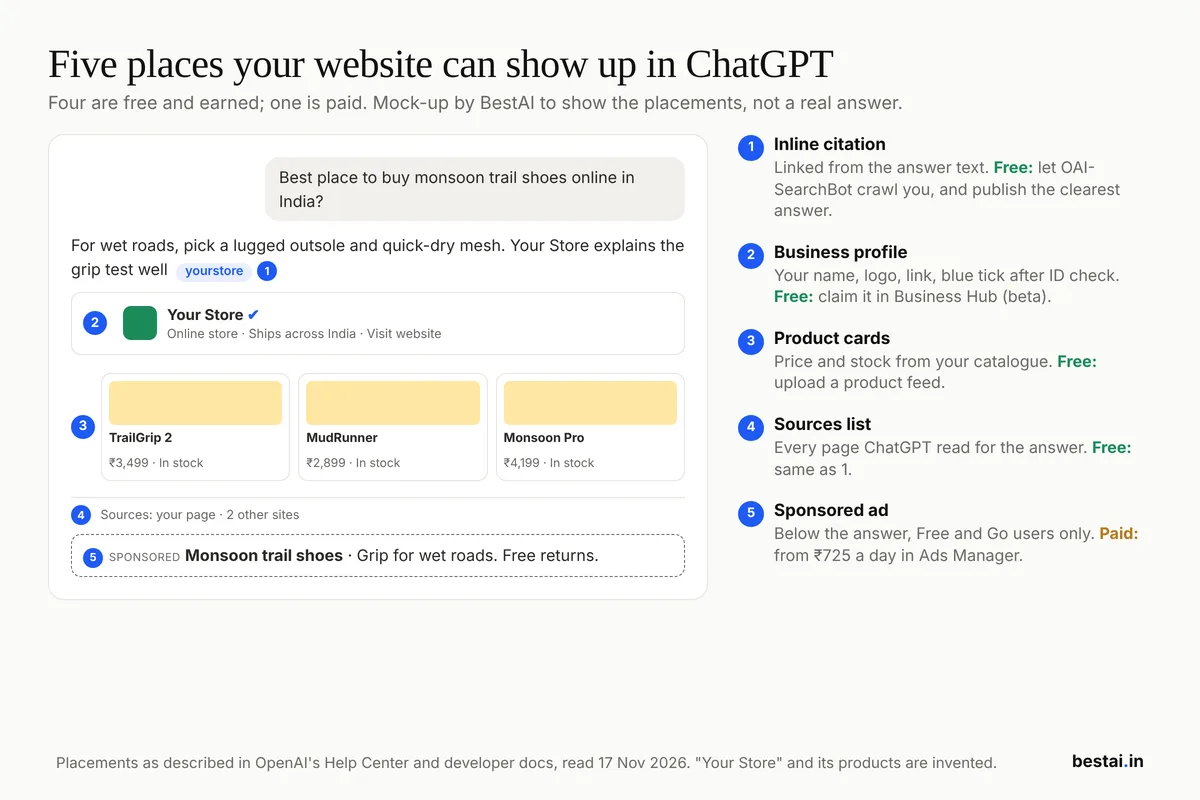 Illustration: BestAI, based on placements described in OpenAI's Help Center and developer docs, 17 November 2026. "Your Store" is invented.
| Placement | What the reader sees | How you get it | Cost |
|---|---|---|---|
| Inline citation | Your site linked from the answer text | Let OAI-SearchBot crawl you; publish the clearest answer | Free |
| Sources list | Your page among the pages ChatGPT read | Same as above | Free |
| Business profile | Name, logo, website link, blue tick after ID check | Claim your business in Business Hub (beta) | Free |
| Product cards | Product, price, stock from your catalogue | Upload a product feed in Business Hub | Free |
| Sponsored ad | A labelled ad below the answer, Free and Go users only | Ads Manager at ads.openai.com | From ₹725 a day |
Do them in that order. The free routes compound; the ad stops the day the budget does.
Step 1: Let ChatGPT's search crawler read your site
Nothing else on this page matters if ChatGPT cannot fetch your pages. OpenAI's crawler documentation is direct: "Sites that are opted out of OAI-SearchBot will not be shown in ChatGPT search answers, though can still appear as navigational links."
OpenAI runs separate bots for separate jobs, and each one is controlled on its own in robots.txt:
| Bot | What it does | Block it if... |
|---|---|---|
| OAI-SearchBot | Finds pages to show in ChatGPT search answers | Never, if you want to appear in answers |
| GPTBot | Collects pages that may train OpenAI's models | You don't want your content used for training |
| ChatGPT-User | Visits a page when a user asks ChatGPT to | Not controllable by robots.txt; user-initiated |
| OAI-AdsBot | Checks landing pages submitted as ads | Never, if you run ChatGPT ads |
Source: OpenAI's Overview of OpenAI Crawlers, read 17 November 2026.
You can appear in answers without feeding training. Add this to your robots.txt to allow search and refuse training:
User-agent: OAI-SearchBot
Allow: /

User-agent: GPTBot
Disallow: /
Then check three things that block more Indian sites than robots.txt does:
- Your CDN or hosting firewall. OpenAI's web search help says your host must also accept traffic from OpenAI's published IP addresses, listed at openai.com/searchbot.json. Look for any "block AI bots" or bot-fight setting in your CDN or hosting panel and make sure it doesn't catch OAI-SearchBot.
- Your noindex tags. A noindex meta tag keeps a page out, but only if OAI-SearchBot is allowed to read the tag, per OpenAI's publisher FAQ.
- The wait. OpenAI says robots.txt changes take about 24 hours to reach its search systems.
If you want to see a working file, ours is at bestai.in/robots.txt; it allows every major AI search crawler and keeps them out of the admin and API paths.
Step 2: Rank higher in ChatGPT with pages it can quote
Being crawlable makes you eligible. Being quoted, the goal of what marketers now call GEO (generative engine optimisation), depends on whether your page answers the question better than the other pages ChatGPT read. OpenAI's publisher FAQ is clear that meeting the technical rules does not guarantee placement.
What gets a page quoted, from how we build every page on this site:
- Answer in the first two sentences. "Is X free?" pages that bury the answer under three paragraphs of history lose to a page that says "Yes, up to 10 minutes a month" at the top.
- Put the facts in HTML, not images. Prices, plan limits and specs in a real table are easy to extract; the same numbers inside a JPG are invisible to a crawler.
- Date your facts. "₹399 a month, checked 17 November 2026" is safer to quote than "affordable pricing".
- Say the India answer. If your page gives the rupee price, GST, UPI support or Hindi availability, you are often the only source that can answer an India-specific question.
- Keep content in the page source. Text that loads only after a click or through heavy client-side scripts may not be read.
This is the same work that ranks pages on Google, which is why we treat it as one job. Other answer engines reward it too; our ChatGPT vs Perplexity comparison shows how differently the two display their sources.
Step 3: Claim your business in ChatGPT (free, beta)
In November 2026 OpenAI launched Businesses in ChatGPT, a beta that lets you claim the profile ChatGPT shows when it mentions your business. You manage it in Business Hub at chatgpt.com/business-hub.
What India-based businesses can and cannot do today, per OpenAI's setup guide:
| Feature | Available to Indian businesses? |
|---|---|
| Claim your business | Yes: "Any eligible business located where ChatGPT is available" |
| Claim a local shop or restaurant listing | No: local stores can currently claim only existing US listings |
| Business Agent (answers customer questions) | No: US ecommerce and online-service businesses only, for now |
| Insights on mentions and clicks | Yes, after identity verification |
How to claim it:
- Open Business Hub and search for your business.
- Prove you control it by phone, business email, website domain or Shopify.
- Complete identity verification with Persona. OpenAI says you may need a government-issued ID, business registration details and proof that you can represent the business.
- Edit your details once Persona approves you. Only then do changes publish, insights unlock and the blue tick appears.
If someone else has already claimed your profile, open it, choose the ••• menu and select Dispute ownership.
The insights cover the last 28 days: how often ChatGPT referenced your website, how many clicks it sent and the topics of those conversations. For an online business, OpenAI counts a mention only when ChatGPT references your website, not when it says your brand name. That is the first official measure of ChatGPT visibility, and it is free.
One warning from early users: owners outside the US reported Persona checks failing with no reason given, in OpenAI's developer forum during launch week. Use documents whose names match exactly, and expect a retry.
Step 4: Upload a product feed if you sell products
If you sell physical goods, a product feed is how your prices and stock get into ChatGPT's shopping answers instead of whatever it scraped last month. OpenAI's product feed docs give the sequence:
- Claim your business in Business Hub (step 3).
- Open the product section and verify your identity; uploads are locked until you do.
- Choose the countries and currencies you sell in, such as India and INR.
- Prepare the feed with the required fields for every item:
item_id,title,description,url,brand,seller_name,image_url,availabilityandprice. Keepitem_idvalues stable. - Deliver it by manual upload, a hosted HTTPS URL or SFTP, then fix any errors the upload reports.
OpenAI's shopping help says merchants are ranked on availability, price, quality and whether they are the maker or primary seller of the item. A feed does not buy rank; it makes sure ChatGPT has your current price when you do rank.
Step 5: Pay for ChatGPT ads (₹725 a day minimum)
ChatGPT ads are the only paid placement, and India-based businesses can buy them themselves. OpenAI's Ads Manager availability page lists India as available for self-service, and the legal entity that advertises and pays must be based in a listed country. OpenAI opened self-serve buying to India, Europe, the Middle East and North Africa from 31 August 2026.
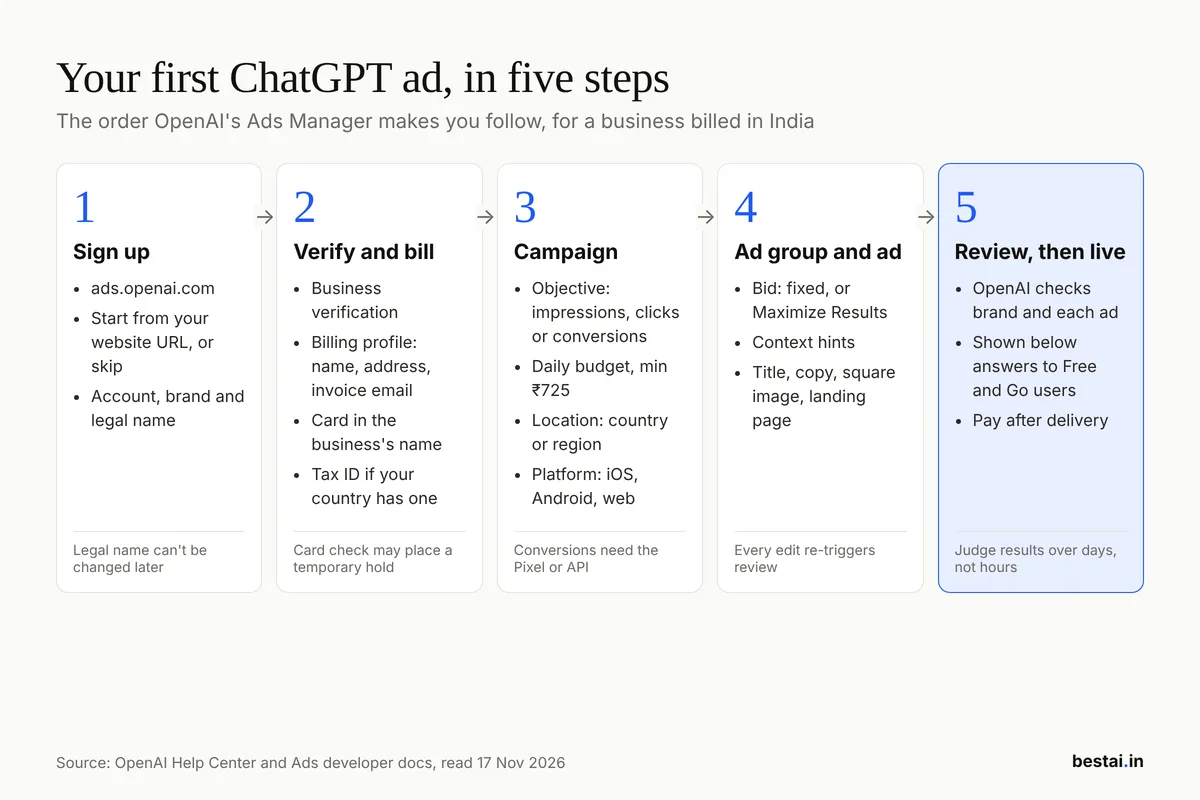 Diagram: BestAI, from OpenAI's Help Center and Ads developer docs, 17 November 2026.
Set up the account
- Sign up at ads.openai.com. You can start from your website URL and build a first ad during signup, or skip it and create campaigns later.
- Choose your three names. Ads Manager asks for an Account Name, a Brand Name and a Legal Name. Use the legal name exactly as it appears in your registration; it is used for billing and verification, and OpenAI warns some account settings cannot be changed after creation.
- Complete business verification. OpenAI's verification article says ads need business verification only, with your legal name, a current address and possibly a tax ID or registration number.
- Set up billing. Create a billing profile (business name, address, invoice email) and add a card that matches the business entity and country. Adding a card can place a temporary authorisation hold.
How billing works: ChatGPT ads are postpaid. OpenAI charges your card when spend reaches your account's payment threshold, and fees exclude taxes. You can add tax IDs in Ads Manager where your billing country supports them. OpenAI's billing pages we read did not mention GST or GSTIN by name, so check the tax ID options in your own account before assuming you can claim input credit.
Build the campaign
A campaign holds the objective, budget and targeting; ad groups hold the bid; ads hold the creative.
| Choice | Options | Pay for |
|---|---|---|
| Objective | Impressions, clicks or conversions | Impressions or clicks |
| Bid strategy | Fixed bid, or Maximize Results (clicks or conversions) | Same |
| Location | Countries and supported regions | |
| Platform | ChatGPT iOS app, Android app, web | |
| Audiences | Include or exclude your custom audiences | |
| Context hints | Phrases that describe the conversations you fit |
Source: OpenAI Ads developer docs, "Bidding & Budgets" and "Targeting", 17 November 2026.
Two details catch first-time advertisers. Conversion campaigns still bill per click, and they need conversion tracking set up first through OpenAI's Measurement Pixel or Conversions API. And context hints are context, not keywords: OpenAI's troubleshooting guide says they do not decide eligibility the way a search keyword does.
OpenAI's beginner guide suggests a starting maximum of $3 to $5 per click for USD accounts; it publishes no rupee figure. The only Indian data point we found is one agency's own short test: upGrowth reported ₹13.67 per click and ₹581.22 per thousand impressions on growth-marketing queries in Indian metros. That is one advertiser over a few days, not a benchmark.
Know the budget rules
The minimum daily budget is ₹725 for an account billed in rupees. It sets your average, not your ceiling.
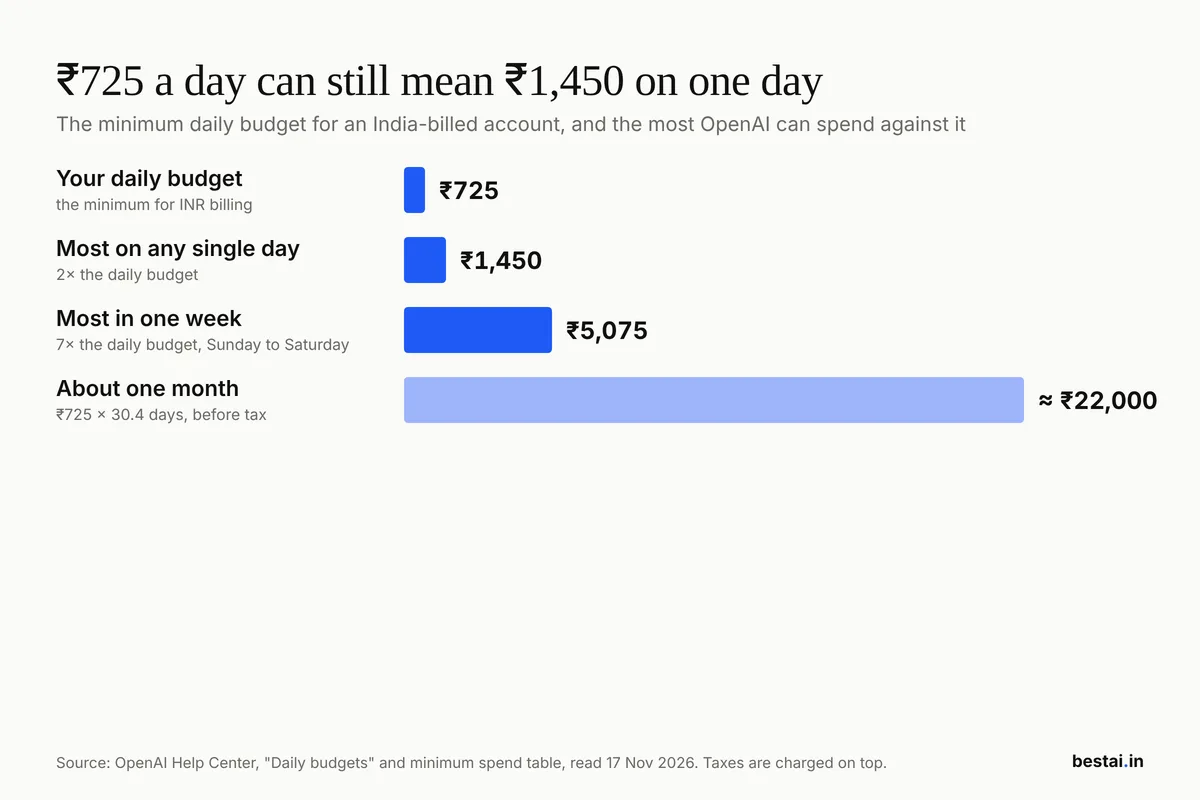 Chart: BestAI, data from OpenAI's Help Center "Daily budgets" article and minimum spend table, 17 November 2026.
OpenAI averages the daily budget over a Sunday-to-Saturday week. On any one day it can spend up to twice the budget, and over the week up to seven times it. At the minimum, that is roughly ₹22,000 a month plus tax.
Write the ad
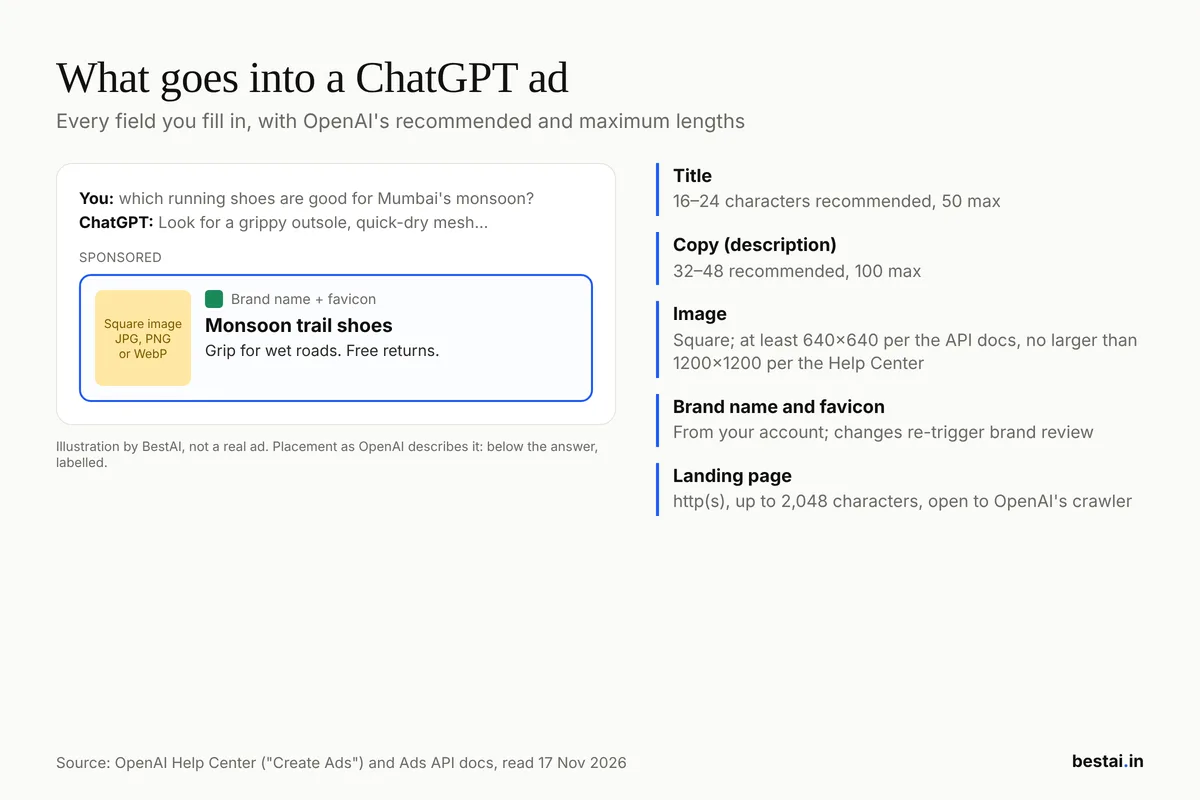 Illustration: BestAI, not a real ad. Field limits from OpenAI's Help Center "Create Ads" article and Ads API docs, 17 November 2026.
- Title: 16 to 24 characters recommended, 50 maximum.
- Copy: 32 to 48 characters recommended, 100 maximum.
- Image: square; the Help Center says no larger than 1,200 x 1,200 pixels, and the API docs ask for at least 640 x 640.
- Landing page: an http or https URL up to 2,048 characters that OAI-AdsBot can open.
OpenAI may rewrite your headline and description, resize images or translate the ad to make it more relevant, per its creative enhancements article. Read your live ad, not just the one you submitted. Every edit to the creative also sends the ad back for review.
Who sees your ad, and who doesn't
Ads appear only to adults on ChatGPT Free and Go; accounts OpenAI identifies as under 18 are excluded. Plus, Pro, Business, Enterprise and Edu accounts see no ads, and neither do Temporary Chats, per OpenAI's Ads in ChatGPT page. In India that means the large Free base and Go subscribers at ₹399 a month; see our ChatGPT Go vs Plus guide for who is on which plan.
OpenAI also keeps ads away from conversations about personal health, mental health and politics, and advertisers receive only aggregated numbers such as views and clicks, never chats.
What you can't advertise from India
This is where many Indian businesses stop. OpenAI's ad policies are much stricter outside the US:
| Category | Outside the US |
|---|---|
| Political ads | Not allowed anywhere |
| Legal services | Prohibited |
| Health services | Generally prohibited |
| Financial services | Generally prohibited; deposit accounts and insurance only for select approved advertisers |
Source: OpenAI ad policies and Help Center eligibility table, 17 November 2026.
Our call: if you sell loans, insurance, clinic appointments or legal services in India, don't open an Ads account yet. Spend the time on steps 1 to 3, which have no category ban.
If your ad isn't showing
OpenAI's troubleshooting guide says to check the chain top-down before raising a bid:
- Account: active, brand review done, spend limit not used up.
- Campaign: active, inside its schedule, budget left, targeting valid.
- Ad group: active, bid strategy compatible with the objective.
- Ad: approved (not "in review"), landing page reachable.
A raised bid will not fix a paused campaign or a rejected ad. When you change something, change one setting and compare results over days, not minutes.
How to tell whether it's working
ChatGPT adds utm_source=chatgpt.com to the links it sends, per OpenAI's publisher FAQ, so ChatGPT visits show up as their own source in Google Analytics, Umami or any analytics tool that reads UTM tags. Pair that with Business Hub's 28-day mentions and clicks, and with Ads Manager's reports if you advertise.
Our recommendation for a small Indian business with one website: do steps 1 to 4 this week, they cost nothing but an afternoon and an ID check. Treat ads as a paid experiment at about ₹22,000 a month once you know which questions already bring ChatGPT visitors, because those questions tell you which conversations are worth paying to appear in.
FAQ
Can I register or submit my website to ChatGPT?
No. OpenAI has no URL submission form for ChatGPT search. Allow OAI-SearchBot in robots.txt and in your firewall, and ChatGPT can find your pages; claim your business in Business Hub so it has your verified details.
Does blocking GPTBot remove my site from ChatGPT answers?
No. GPTBot controls training only. OpenAI says each bot setting is independent, so you can block GPTBot and still appear in ChatGPT search through OAI-SearchBot.
How much do ChatGPT ads cost in India?
The minimum daily budget is ₹725 for an account billed in rupees, which can spend up to ₹1,450 on a single day and about ₹22,000 a month. You pay per click or per thousand impressions depending on the campaign; OpenAI publishes no rupee benchmark.
Can an Indian local shop or restaurant claim its ChatGPT listing?
Not yet. OpenAI's Help Center says local stores and restaurants can currently claim only existing US listings. Indian online businesses can claim their profile through Business Hub.
Do ChatGPT Plus users see ads?
No. Ads appear only on the Free and Go plans; Plus, Pro, Business, Enterprise and Edu are ad-free.
Cover image: A phone showing ChatGPT on a yellow background. Jernej Furman, CC BY 2.0, via Wikimedia Commons.
Related tools
We may earn a commission if you buy through our links. This doesn't affect our rankings. Learn more about our affiliate disclosure.

ChatGPT
The most widely used AI chatbot for writing, coding, and research.

Perplexity
AI search engine that answers questions with cited sources.

Gemini
Google's multimodal AI assistant integrated across Search, Workspace, and Android.
See more of BestAI.in in Google's Top Stories: add us as a preferred source.