AI Wedding Photo Prompt: 12 Ideas for Gemini and Invites
A good AI wedding photo prompt describes one function, haldi, mehendi, sangeet or the pre-wedding shoot, and tells Gemini to keep faces unchanged. For printed cards, a free 1K Gemini image is sharp only up to about 2.8 x 4.2 inches, so finish invites in Canva or Adobe Express.

Wedding season is close: wedding-date calendars published by Dainik Jagran list the first muhurats of the season from 21 November 2026, with more in early December, though dates differ by city and panchang, so check yours. That makes the next three weeks the time to sort out save-the-dates, invites and pre-wedding pictures.
This guide gives an AI wedding photo prompt for each function, invitation prompts that put your photo on the card, and mehendi design prompts, then covers the parts the prompt pages skip: whether an AI invite will print sharply, how to send it on WhatsApp without blurring it, and which tool to use for what. If you want the basics of keeping a face unchanged in Gemini, our Diwali AI photo prompt guide covers them in detail; we don't repeat them here. We wrote these prompts from Google's published prompting advice and haven't tested them on your photos, so expect to try a couple of versions.
Which AI tool should you use for wedding photos and invites?
Each tool is good at one part of the job. Use them together rather than forcing one to do everything.
| Tool | Best for | Free use | Paid in India |
|---|---|---|---|
| Gemini | Editing your own photos into a wedding scene | Daily limits (not published as numbers) | Google AI Plus ₹399/month |
| ChatGPT | Poster-style cards with a chosen shape | Separate image limits on the free plan | Go ₹399/month |
| Canva | Finishing the card: 4,000+ wedding templates, print export | Up to 20 AI uses a month | Pro Lite ₹1,590/year, Pro ₹4,000/year |
| Adobe Express | Free invitation templates and video invites | Free, "no credit card required" | Premium ₹398.84/month |
Sources: Canva's AI access help page and wedding template gallery, Adobe Express India pricing; Canva rupee prices from our India AI tool price index.
How do you make an AI wedding photo in Gemini?
Upload a clear photo in the Gemini app, paste a prompt and send it. Two rules from Google's image help page matter for weddings: editing a photo of a person needs an account for someone aged 18 or over, and the standard Nano Banana 2 model can take several reference images, so you can upload the bride and groom separately. Google's developer documentation says its current image models keep the resemblance of up to four people, which covers a couple with both sets of parents.
Every prompt below ends with the same instruction. Keep it, because it is what stops the faces changing:
Keep every person's face, facial features, skin tone and expression exactly as in the uploaded photos. Change only the clothing, background and lighting described.
AI wedding photo prompt ideas for every function
1. Haldi
Show the couple from the uploaded photos at their haldi ceremony in a sunlit courtyard, both in yellow cotton outfits, laughing as family hands (no faces) apply turmeric paste. Marigold strings overhead, bright morning light, candid documentary style. Keep every person's face, facial features, skin tone and expression exactly as in the uploaded photos. Change only the clothing, background and lighting described.
2. Mehendi
Show the bride from the uploaded photo seated on floor cushions at her mehendi, wearing a green and pink lehenga, holding up her hennaed palms towards the camera. Soft afternoon light, pastel drapes and floral cushions behind. Keep the person's face, facial features, skin tone and expression exactly as in the uploaded photo. Change only the clothing, background and lighting described.
3. Sangeet
Show the couple from the uploaded photos dancing on a stage at their sangeet, she in a sequinned lehenga and he in a bandhgala, with warm stage lights and gentle motion blur in the background crowd. Joyful, cinematic, 50mm look. Keep every person's face, facial features, skin tone and expression exactly as in the uploaded photos. Change only the clothing, background and lighting described.
4. Pre-wedding shoot at a fort
Show the couple from the uploaded photos walking hand in hand through the sandstone arches of a Rajasthani fort at golden hour, she in a flowing red saree and he in a cream sherwani. Warm sunlight, long shadows, editorial pre-wedding photography. Keep every person's face, facial features, skin tone and expression exactly as in the uploaded photos. Change only the clothing, background and lighting described.
5. Pre-wedding shoot by the sea
Show the couple from the uploaded photos on a beach at sunset, barefoot at the water's edge, she in a pastel lehenga and he in a white kurta, wind in the fabric. Soft pink and orange sky, relaxed and romantic. Keep every person's face, facial features, skin tone and expression exactly as in the uploaded photos. Change only the clothing, background and lighting described.
6. Wedding-day portrait at the mandap
Show the couple from the uploaded photos seated at a mandap decorated with marigolds and white jasmine, she in a red bridal lehenga and he in a gold sherwani with a safa, during the ceremony. Warm firelight from the havan, rich colours, formal portrait. Keep every person's face, facial features, skin tone and expression exactly as in the uploaded photos. Change only the clothing, background and lighting described.
7. Reception
Show the couple from the uploaded photos at their evening reception, she in a silver gown and he in a black tuxedo, standing in front of a floral wall with fairy lights. Elegant, soft bokeh, magazine-style portrait. Keep every person's face, facial features, skin tone and expression exactly as in the uploaded photos. Change only the clothing, background and lighting described.
8. Family portrait with both sets of parents
Show the six people from the uploaded photos posed together at the wedding venue, the couple in the centre in wedding outfits and both sets of parents in festive traditional clothes on either side. Warm, even lighting, formal family photograph. Keep every person's face, facial features, skin tone and expression exactly as in the uploaded photos. Change only the clothing, background and lighting described.
Google's documentation puts the resemblance limit at four people, so for six, expect to fix faces one at a time or use a real group photo as the base.
AI wedding invitation prompt with photo
Google gives one tip that matters a lot for cards: "Gemini works best if you first generate the text and then ask for an image with the text." So send the wording first, check it, then ask for the card.
9. Photo invitation card
First message: Here is the text for our wedding invitation. Repeat it back exactly: "Priya & Arjun · Wedding · Saturday, 5 December 2026 · Hotel Rambagh, Jaipur".
Second message: Now create a portrait wedding invitation card using the uploaded photo of the couple at the top, on an ivory background with gold paisley borders and marigold corners, with the text above placed below the photo in elegant gold lettering. Keep both faces exactly as in the uploaded photo.
10. Save-the-date
Create a save-the-date image using the uploaded photo of the couple, in soft pastel tones with "Save the Date" and "05.12.2026" in clean modern lettering. Keep both faces exactly as in the uploaded photo.
Replace the names, date and venue with yours, and proofread every letter in the result: names and dates are where image models slip. For Hindi wording, Gemini is a better bet than for other Indian scripts: Google's image documentation lists Hindi among the languages with the best performance and no other Indian language. For Tamil, Telugu, Bengali, Marathi or Gujarati text, generate the artwork without text and type the wording on top in Canva or Adobe Express.
Mehendi design prompts (no photo needed)
You don't need anyone's photo to design mehendi, and because this is generation rather than editing, Gemini's under-18 rule for photo editing doesn't apply. Save the results as a reference sheet for your mehendi artist.
11. Bridal full-hand design
Create a detailed bridal mehendi design reference on a plain white background: full front-and-back hand pattern with paisleys, lotus, peacock and mandala motifs, fine lines, dark henna colour. Flat, top-down view, no hand or person.
12. Simple Arabic design with initials
Create a simple Arabic-style mehendi design on a plain white background: a diagonal floral trail across the palm with leaves and dots, with the initials "P" and "A" hidden in the vines. Flat, top-down, no hand or person.
Will an AI wedding card print sharply?
Often not, if you print it straight from Gemini. Canva's help centre says "the minimum recommended resolution for printing is 300 dots per inch". Here is what Gemini's image sizes mean at that standard, using the pixel sizes in Google's developer documentation for a 2:3 portrait card:
| Gemini download | Pixels (2:3) | Sharp print size at 300 DPI |
|---|---|---|
| 1K (free) | 848 x 1264 | about 2.8 x 4.2 inches |
| 2K (Google AI plan) | 1696 x 2528 | about 5.7 x 8.4 inches |
A common 5 x 7 inch card needs 1500 x 2100 pixels at 300 DPI, so a free 1K image would print at roughly 170-180 DPI and look soft. The practical fix: use Gemini or ChatGPT for the artwork, place it in a Canva or Adobe Express template, set the text there, and export as a print PDF. Canva's PDF Print option exports at 300 DPI with bleed and crop marks, and CMYK export is included in Canva Pro Lite, a cheaper plan available in India.
How should you send an AI invite on WhatsApp?
Social apps compress images: Canva notes that platforms "compress uploaded images and limit resolution to 1080p", and recommends PNG for designs with text. On WhatsApp, send the invite as an HD photo for quick viewing on phones, and send the print PDF or full-size file as a document, which WhatsApp delivers without compression up to 2 GB, for anyone who wants to print it. For a sangeet track to go with the invite, our guide to the AI song generators that sing in Hindi compares the free options.
Should you ask before editing relatives' photos?
Yes, as a matter of courtesy. Google's generative AI use policy prohibits using personal data or biometrics "without legally-required consent" and impersonating people to deceive. Our honest read of India's data protection law is that it exempts data used for purely personal or domestic purposes, so a family invite is unlikely to be a legal problem, but grandparents, guests and especially children in a group photo should still be asked before their faces go into an AI edit that gets shared.
Two more things to know before you post: images made in Gemini in India carry a visible watermark, and Instagram may ask whether a post is AI-generated under India's 2026 IT rules. Our Diwali prompt guide explains both, and our guide to writing AI image prompts helps if you want to build your own.
FAQ
What is the best AI wedding photo prompt?
One that names the function (haldi, mehendi, sangeet, pre-wedding or wedding day), describes outfits, setting and light in full sentences, and ends by telling the AI to keep every face, skin tone and expression unchanged. The 12 prompts above follow that pattern.
Can I make a wedding invitation with AI for free?
Yes. Gemini and ChatGPT can create the artwork on their free plans within daily limits, and Adobe Express offers free wedding invitation templates with no credit card required. For a sharp printed card, finish the design in Canva or Adobe Express and export a print PDF.
Can Gemini write Hindi text on a wedding card?
It can, and Google lists Hindi among the languages its image models handle best. For other Indian scripts, add the text yourself in Canva or Adobe Express, and proofread names and dates in any language.
Is a free Gemini image good enough to print a wedding card?
Only for small prints. A free 1K Gemini image in a 2:3 shape is 848 x 1264 pixels, sharp at 300 DPI only up to about 2.8 x 4.2 inches. A 5 x 7 inch card needs about 1500 x 2100 pixels.
How many people can Gemini keep accurate in one AI wedding photo?
Google's developer documentation says its current image models keep the resemblance of up to four people. For larger family photos, edit faces one at a time or start from a real group photo.
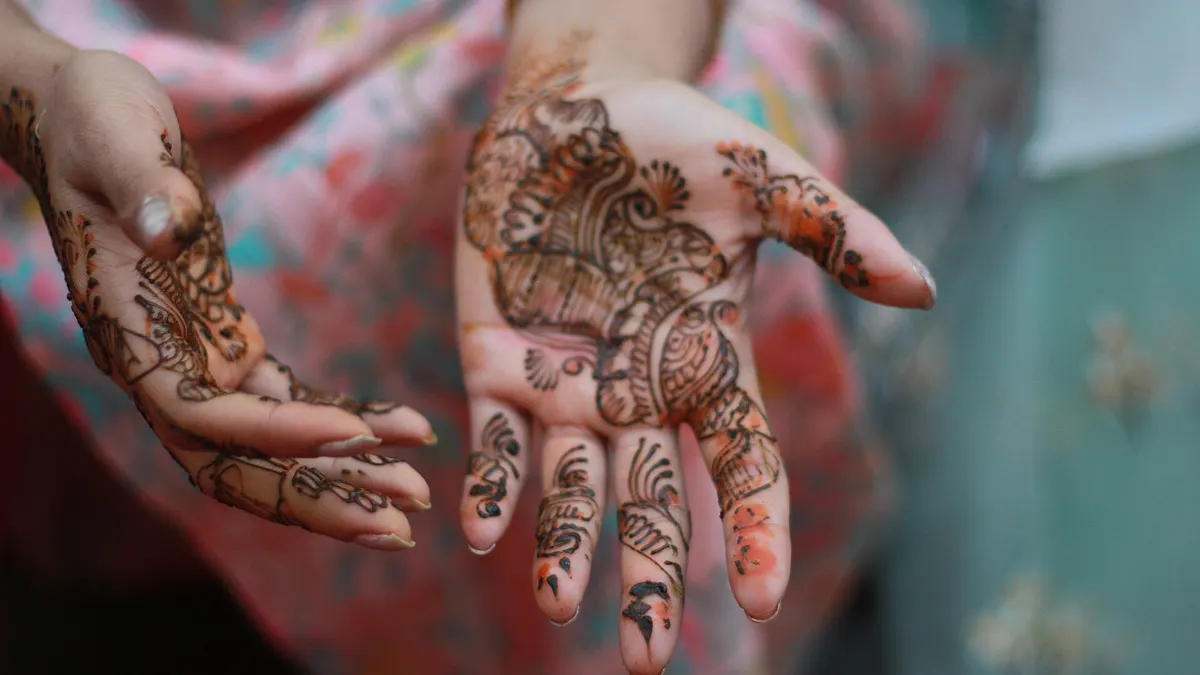
Cover image: Goutam1962, CC BY-SA 4.0, via Wikimedia Commons.
Related tools
We may earn a commission if you buy through our links. This doesn't affect our rankings. Learn more about our affiliate disclosure.

Gemini
Google's multimodal AI assistant integrated across Search, Workspace, and Android.

ChatGPT
The most widely used AI chatbot for writing, coding, and research.
Canva Magic Studio
AI design tools built into Canva for images, video, and writing.
See more of BestAI.in in Google's Top Stories: add us as a preferred source.