Gamma Pricing in India: Plus, Pro and Ultra in Rupees
Gamma pricing in India: Plus costs ₹4,800 a year (₹400 a month) and Pro ₹11,400 a year (₹950 a month), before tax, as shown from an Indian connection on 24 October 2026. Gamma accepts UPI in India. The Free plan's credits never refresh, and refunds close after 3 days.

Gamma shows visitors in India its prices in rupees, takes UPI, and quietly runs everything on credits, which is the part most pricing pages skip. A plan's price tells you what you pay; the credits tell you how many decks that buys before Gamma asks for more.
This guide to Gamma pricing in India uses two sources. The rupee prices are what Gamma's pricing page showed from an Indian internet connection on 24 October 2026, in our India price index. Everything else (credits, refunds, payment, invoices) comes from Gamma's Help Center, read on 17 November 2026. Gamma's pricing page blocks automated checks, so confirm the price at checkout before you pay.
Gamma pricing in India: every plan
The annual plans are the only ones we have rupee prices for. Gamma says annual billing costs 28% less than paying monthly.
| Plan | Price in India (annual billing) | Monthly AI credits | Who it's for |
|---|---|---|---|
| Free | ₹0 | One-time credits, no refresh | Trying Gamma on a few decks |
| Plus | ₹400/month, ₹4,800 a year | 1,500 | Students, freelancers, a deck or two a week |
| Pro | ₹950/month, ₹11,400 a year | 4,000 | Regular users who need API access, custom domains or viewer analytics |
| Ultra | ₹7,833.25/month, ₹93,999 a year (see note) | 20,000 | Heavy AI image and generation users |
| Team | Annual only; price not captured | 6,000 | Small teams |
| Business | $40 per member a month, billed annually | 10,000 per member | Companies that need SSO |
| Enterprise | On request | Through Gamma's account team | Large rollouts |
Sources: India prices from gamma.app/pricing on 24 October 2026 (BestAI India price index); credits and Business price from Gamma's Help Center, 17 November 2026. Prices before tax; Gamma's page says "Prices are subject to tax depending on your location."
Two things to know about that table:
- Prices are per seat. Gamma bills every member of a workspace. Two people on Pro pay twice the Pro price, per Gamma's per-member billing article.
- Ultra may now be monthly only. Our 24 October capture showed an annual Ultra price, but Gamma's Help Center, updated in November, says Ultra is "only available monthly" at an introductory price. Check the toggle at checkout.
We did not capture the monthly-billing rupee prices. If the 28% annual discount applies exactly, Plus billed monthly would be about ₹555 and Pro about ₹1,320; that is our arithmetic, not a price Gamma showed us.
Which Gamma plan is the best value?
Measured per credit, Gamma pricing in India favours Pro, not Plus.
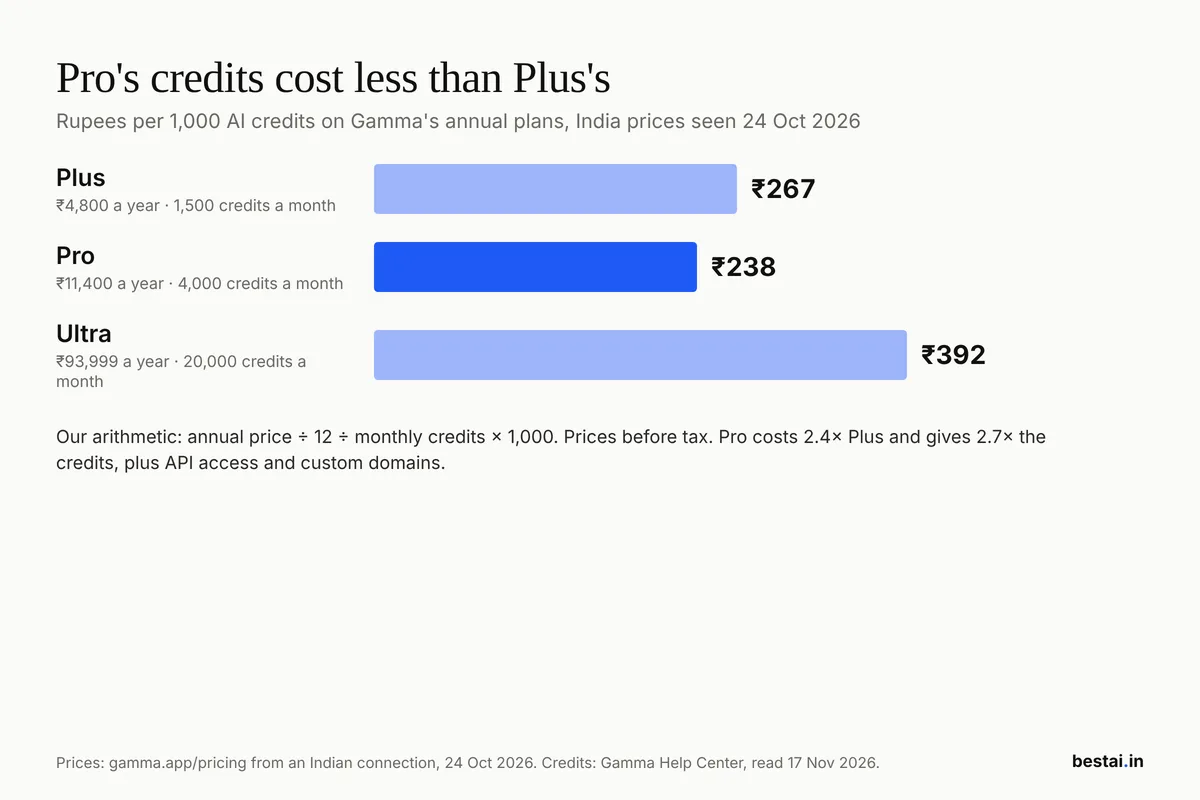 Chart: BestAI. Prices from gamma.app/pricing in India, 24 October 2026; credits from Gamma's Help Center, 17 November 2026.
Pro costs 2.4 times Plus and gives 2.7 times the credits, so each credit is about 11% cheaper. Ultra is the most expensive per credit; you pay for its top image models and 100 custom domains, not for cheap credits.
Our call: start on Plus. Most people who make a few decks a week will not use 1,500 credits, and unused credits are wasted beyond the rollover cap. Move to Pro only when you run out two months in a row, or when you need Pro's features: API access, viewer-level analytics, password protection or publishing sites on your own domain.
What the Free plan really gives you
Gamma's Free plan is generous to try and stingy to keep. Per Gamma's credits guide:
- Credits do not refresh. You get a starting balance; when it is gone, it is gone.
- Referrals earn 200 credits each, up to a balance of 2,000 credits at a time.
- Generations are capped at 10 slides per prompt (paid plans: 100).
- Shared and exported decks carry the "Made with Gamma" badge, which only paid plans remove.
- Free users cannot buy extra credits; they have to upgrade.
How Gamma credits work
Every AI action spends credits: generating a deck, adding cards with AI, trying new layouts, and creating or editing AI images. Typing, moving content and picking themes are free, so a deck you finish by hand costs nothing extra.
- No fixed rate per deck. Gamma meters credits per slide and per image, and says the cost varies with the model and the length of the generation. Image tools show their credit cost before you generate.
- Unused credits roll over up to twice your plan size: 3,000 on Plus, 8,000 on Pro.
- Annual plans still refill monthly. You do not get a year of credits up front.
- Extra credits start at $6 for 1,500, at one flat rate with no bulk discount, per Gamma's top-up article. Gamma shows the amount in your currency before you confirm. Purchased credits do not expire while your plan is active and are kept for a year after you cancel.
- Failed actions are free. Gamma does not charge credits when an AI action errors or asks you a clarifying question.
How to pay for Gamma in India
Gamma's payment methods article lists credit cards, debit cards and "UPI - available in India". Payments run through Stripe.
- Open Gamma, go to Settings & members, then Upgrade.
- Pick Plus or Pro and choose Annual or Monthly.
- Enter your company name and tax ID at checkout if you need them on the invoice (see below).
- Pay by card or UPI.
If your card is declined, Gamma says it is almost always your bank blocking an international or online payment. Turn on international transactions in your banking app, or use UPI.
GST and invoices
Gamma's pricing page says prices are "subject to tax depending on your location", so expect tax to be added at checkout. Gamma's help pages do not name GST, so look at your first invoice to see what was charged.
For a business invoice, enter your company details and tax ID during your first checkout. Gamma's invoice guide says issued invoices cannot be edited, and fixing a wrong first invoice means cancelling, getting a refund and resubscribing. Downloads are under Settings > Billing > Manage subscription in Stripe > Invoice history.
Gamma refund policy: 3 days and a credit limit
Gamma refunds only within 3 days of subscribing, only when you contact support, and only if you have used less than a set share of your credits:
| Plan | Monthly credits | Refund only if you used fewer than |
|---|---|---|
| Plus | 1,500 | 300 credits |
| Pro | 4,000 | 600 credits |
| Team | 6,000 | 900 credits |
| Business | 10,000 | 1,000 credits |
| Ultra | 20,000 | 2,000 credits |
Source: Gamma's refund policy, 17 November 2026.
Cancelling within 3 days does not refund you automatically; you have to ask. If you are testing Gamma, test on the Free plan first, because one long AI generation on a new paid plan can push you past the refund limit.
Is there a Gamma coupon or student discount?
No code from us, and no public education discount from Gamma that we could find.
- Promo codes work only on your first paid subscription, moving from Free to paid. They cannot be used when upgrading from Plus to Pro, per Gamma's promo code guide.
- The only standing discount is annual billing, at 28% off monthly.
- Students and teachers: Gamma's help pages list no education or nonprofit pricing. The request is open on Gamma's ideas board, with 38 votes when we looked, and no programme announced. The codes on coupon sites are not from Gamma's own pages; we do not list them.
How to cancel or downgrade Gamma
- Go to Settings > Billing.
- Click Cancel subscription at the bottom of the page. If it is greyed out, you are not the billing admin.
- Your plan stays active until the end of the billing period, then the workspace returns to Free.
Downgrading, say from Pro to Plus, takes effect at the end of the period with no proration, per Gamma's cancellation guide. Upgrading works the other way: it starts at once and charges the prorated difference for each seat.
Removing a team member does not lower your bill by itself; you also have to reduce the seat count in the Members settings.
Gamma vs the alternatives on price
If Gamma pricing in India or its credit system puts you off, the closest alternatives price differently. Our Canva vs Gamma comparison covers when a design tool beats a deck generator, and our AI presentation maker guide compares Gamma, Canva and Beautiful.ai side by side. For free options only, see the free AI presentation tools list.
FAQ
Does Gamma cost money?
Gamma has a free plan, but its AI credits are one-time and never refresh. Regular use needs a paid plan: from ₹400 a month billed annually for Plus in India.
What is the price of Gamma Plus in India?
Gamma Plus cost ₹400 a month billed annually, or ₹4,800 a year before tax, on Gamma's pricing page from an Indian connection on 24 October 2026. Monthly billing costs more; Gamma says annual saves 28%.
Can I pay for Gamma with UPI?
Yes. Gamma's Help Center lists UPI as a payment method available in India, alongside credit and debit cards.
Does Gamma's free plan reset every month?
No. On the Free plan, credits do not refresh. You can earn 200 credits per referral, up to a balance of 2,000, or upgrade to a paid plan whose credits refill monthly.
Can I get a refund from Gamma?
Only within 3 days of subscribing, by contacting support, and only if you used under the plan's limit: fewer than 300 credits on Plus or 600 on Pro.
Is Gamma Pro worth it over Plus?
Only if you use the extra. Pro's credits are about 11% cheaper each, and it adds API access, custom domains and viewer analytics, but at ₹11,400 a year against ₹4,800 most occasional users are better off on Plus.
Cover image: A laptop showing a slide editor, to illustrate presentation software (not Gamma). DERDAKI ILIAS, CC BY-SA 4.0, via Wikimedia Commons.
Related tools
We may earn a commission if you buy through our links. This doesn't affect our rankings. Learn more about our affiliate disclosure.
Gamma
AI tool that turns text or a prompt into a designed presentation, doc, or webpage.
Canva Magic Studio
AI design tools built into Canva for images, video, and writing.

Beautiful.ai
Presentation software with AI-guided design that auto-adjusts layouts.
See more of BestAI.in in Google's Top Stories: add us as a preferred source.